
Recently, I had a request to build an AVD pooled/multi-session host pool that you do not really hear much about. The session hosts needed to be Windows Server 2022 VMs. The first question asked was “can it be done? Yes, it can!
Big Chris Recommends: The old saying, “Just because you CAN do something, doesn’t mean you SHOULD” applies here. For pooled/multi-session host pools, use Windows 11 multi-session.
There are times when you may need to use a Server OS in a pooled host pool, which are exceptions and not the rule. The following are the most common exceptions (and there are few) I have run into:
- Licensing
- The organization does not have Windows Enterprise licensing in place to utilize AVD. Which normally leads to…
- The organization has existing Windows Server client access licenses (CALs) that they want to utilize in lieu of Windows Enterprise licensing.
- Applications
- An application that only runs on a Server class OS needs to be published from a pooled/multi-session host pool.
The next question is, “I can use my Remote Desktop Services (RDS) CALs in AVD?” Yes, you can. At its heart, AVD is built on RDS. Many RDS configurations are utilized in AVD, and the use of CALs for licensing is one of them.
There are a few things to consider when you build a pooled/multi-session host pool with Server 2022 that you do not have to concern yourself with if you use Windows 11 multi-session.
- No need to enable “Session Host” feature on Server 2022
- If you are using Windows Server 2022 Datacenter, “standard” or Azure Edition from the Marketplace, this feature will be automatically enabled.

- Windows licensing and activation
- Since this is not Windows 11, Windows Server licensing and activation need to be handled outside of the users licensing package.
- Licensing and activation can he handled like with a standalone Windows Server by entering a MAK key or using KMS.
- FSLogix
- You can use FSLogix to manage profiles on Server 2022. However, the image from the marketplace WILL NOT have FSLogix preinstalled like the image for Windows 11 multi-session. You will need to use a process to ensure FSLogix will be installed on the session hosts.
Big Chris Recommends: Build an image using the Azure Image Builder so you can utilize the quick start templates to install FSLogix on your Server 2022 session host image.
- No Intune management
- Since it is a Server class OS, Intune will not be available for management. You can use Group Policy (GPO), Configuration Manager, etc. for management.
- Your session hosts will need access to a Remote Desktop License server to utilize the CALs
- Using local policy or GPO, you will find the settings under Computer Configuration > Administrative Templates > Windows Components > Remote Desktop Services > Remote Desktop Session Host > Licensing.
- Use the specified Remote Desktop license servers
- Using local policy or GPO, you will find the settings under Computer Configuration > Administrative Templates > Windows Components > Remote Desktop Services > Remote Desktop Session Host > Licensing.

Specify the licensing mode for the Remote Desktop Session Host server
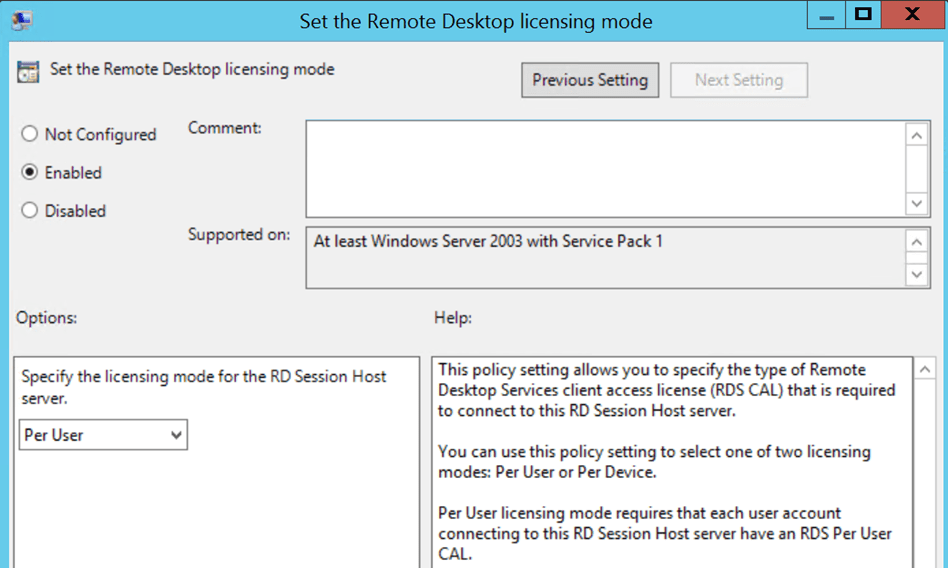
If you have an existing license server, you can utilize that server, or you can build a new server in Azure.
Big Chris Recommends: If you do build a new license server in Azure, make life easy on yourself and place the VM in the same resource group, VNet, SNet as the host pool in Azure.
Once you account for these considerations using Server 2022 in a pooled host pool, the building and deployment are practically the same if you were building a Windows 11 multi-session host pool. Features like session host update and onboarding the host pool and session hosts to AVD Insights will be available.
I hope this helps if you ever need to deploy Server 2022 in a pooled.multi-session host pool!

 Big Chris's Cloud PC Chronicles
Leave a comment